
Edit Form Responses In Google Forms
Do you need to have someone edit form responses AFTER they’ve already submitted them? What if they closed the form and need to edit later? If this is something you’re dealing with, then this article is where you need to be!
Edit Form Responses After They’ve Been Submitted
I recently had a student ask me how he could have people come back to his form and edit their responses. In this article we’ll take a look at how to set up a form that can immediately be edited, as well as how we can get the link for editing a form that has already been closed.
Method 01 – Including the Edit Response Link
For the first method, we’ll simply set the form to include an ‘edit response’ link after the form is submitted.
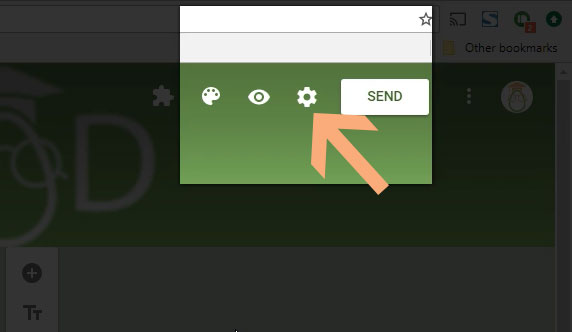
To do this, click on the settings icon in the upper right.
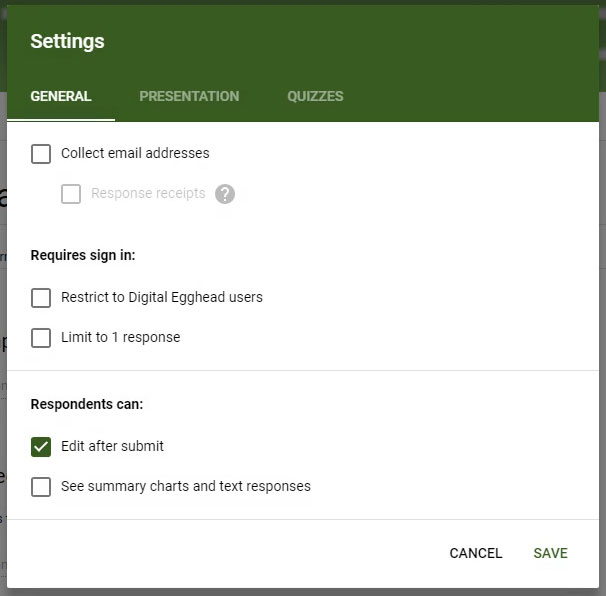
Then check the “Edit after submit” box, and save it.
Now you can preview the form and fill it out. Once you submit the form, you will see that there is a link to edit your response.
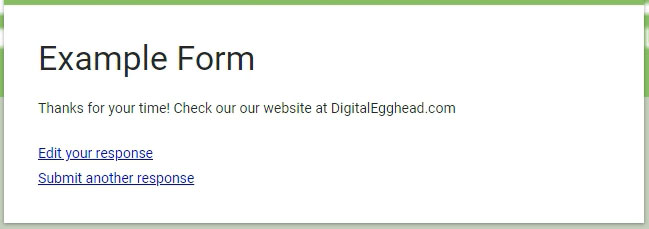
Clicking on that link will bring the form back up to edit. If you have a need for people to come back to the form and edit it later, you can tell them to copy this edit form link and save it somewhere.
That’s a simple way to do it. Now what about the people who have already filled out a form and closed it, but need to go back and edit their response? This is a bit more complex to set up, but once it’s done you can use it over and over.
Method 02 – Retrieving the Form Edit Links
For this method, you’ll set up a script in the response spreadsheet that will insert the edit form links for each response.
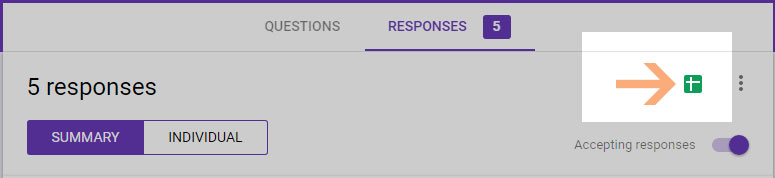
Begin by linking your form to a response spreadsheet. This is done by clinking on the “Responses” tab, then clicking on the green spreadsheet icon.
Once that is done, open the spreadsheet and click on the Tools menu item then Script Editor.
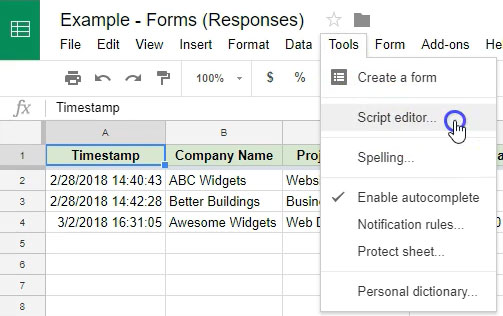
This will open a new tab with the Google Script Editor.
Set up the script
Delete the text that’s already there and replace it with this script:
function assignEditUrls() {

var form = FormApp.openById('Your form key goes here');

var sheet = SpreadsheetApp.getActiveSpreadsheet().getSheetByName('Your responses Google Sheet name goes here - The tab name, not the file name');

var data = sheet.getDataRange().getValues();

var urlCol = Column number where URLs get entered goes here;

var responses = form.getResponses();

var timestamps = [], urls = [], resultUrls = [];

for (var i = 0; i < responses.length; i++) {

timestamps.push(responses[i].getTimestamp().setMilliseconds(0));

urls.push(responses[i].getEditResponseUrl());

}

for (var j = 1; j < data.length; j++) {

resultUrls.push([data[j][0]?urls[timestamps.indexOf(data[j][0].setMilliseconds(0))]:'']);

}

sheet.getRange(2, urlCol, resultUrls.length).setValues(resultUrls);

}
*You can also find the code in this shared Google Doc:
https://docs.google.com/document/d/1m9V_AHZdA24pUAR1xGxQNt_y3k7J9RKoSG5v_9oFvcU/edit?usp=sharing
The red text is what you need to update with information relevant to your form.
The first thing you need to update is the form key. Looking at the form, you’ll see a string of numbers and text in the URL. This is what you need to copy, and paste into the script where it says, “Your form key goes here“.

Next you’ll need the the sheet name. This is referring to the sheet that your responses are stored on, not the file itself. Copy the sheet name and paste it into the script where it says, ” Your responses Google Sheet name goes here – The tab name, not the file name“.

The last thing you’ll need to do is tell the script what column should contain the edit URLs. In this example, the next empty column in this spreadsheet is the sixth one, which means I would enter “6” for the column. You can enter any empty column number you like. Make sure not to accidentally delete the semi-colon. If you do, the script won’t work.
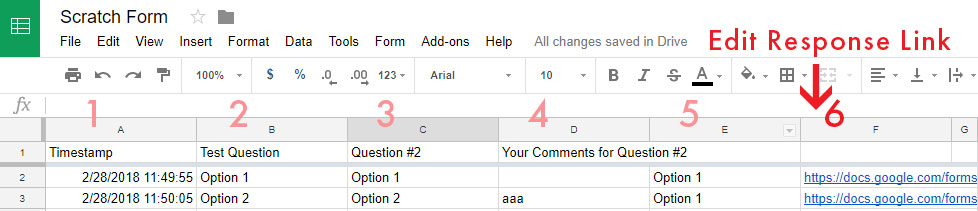
Run the Script
Once you’re done entering your form information, you can save the script. If you haven’t already, give it a name that relates to your form. Now you just need to run the script by clicking on Run,> Run Function > assignEditURLs
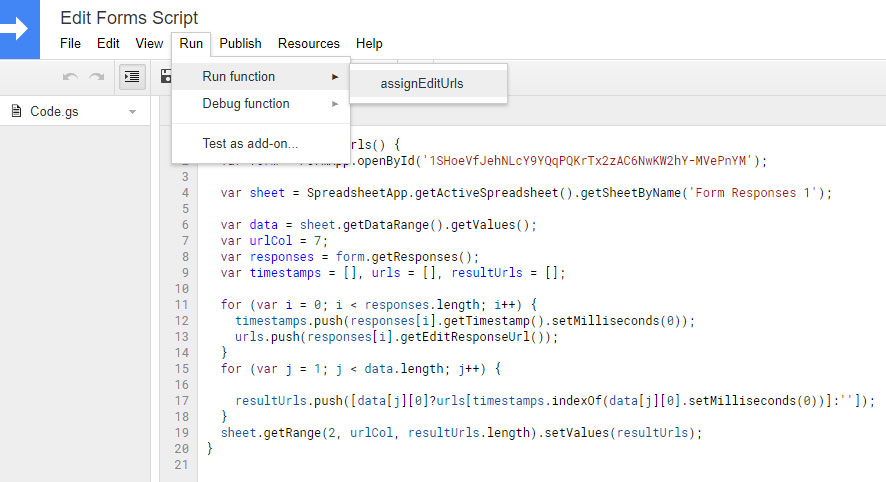
The first time you run the script, it will tell you that Authorization is required. Click on “Review Permissions”, choose your account and click on “Allow”. You may get one more warning about safety. If you do, you still want to allow it. You made the script, so you know it’s safe.
When you go back to the spreadsheet you will see that the URLs have been populated in the column that you designated. If you open one, it will take you directly to the form for that response and allow you to edit it.

After you’ve set this up, all you need to do is run the script any time you want to populate the URLs. You now have the edit URLs to give out to the people who filled out you form if they need to edit them.
PLEASE NOTE – I realize that in the video I’m copying the FormKey from the form’s preview. Make sure that you are using the FormKey from the form while in Edit Mode, not from the preview.
IF YOU DON’T – You will see an error that looks something like this, “TypeError: Cannot read property ‘getSheetByName’ of null (line 4, file “Code”)”
Watch the Video
Watch the video on how to edit form responses in Google Forms to see it in action.
I hope you found this article to be helpful. Comment below to and let me know what you think.
Learn more about Google’s amazing office apps with the best selling Google Cloud Productivity course on Udemy.





Great article, worked perfectly. Thank you!
Thank you for tutorial. It works.
THANK YOU!!! Worked!!!!!
Thanks Joe, this is helpfull.
After run, I am getting an error that says, Invalid ID (line 2, file “Code”). I copied and pasted the Form Key so I know there is not a typo. My Form Responses are linked to an existing spreadsheet. Is that problematic?
I’m receiving this error as well. Need help :-/
Me as well. How did you fix?
Figured out what I did wrong. I was entering the Form ID of the response form, when I should have been entering the Form ID of the Google Form in edit mode itself. After that the script worked perfectly. TY
Awesome! I’m glad you were able to get it resolved 🙂 Sorry it took me so long to respond.
The form key picture/screenshot above is showing that the key should be copied from preview mode and not in edit mode (because you can see in the picture “viewform” at the end of the url). I had the same issue at first because I did not know that the key had to be taken from edit mode (I was going by the pictures).
I am not able to get this to work – not sure what I am doing incorrectly. When I use the form id (edit mode) it runs I don’t get an error, and it appears to run through, however, the links do not populate in the spreadsheet. Please HELP.
I am not able to get this work. When I use the form id (edit mode), I do not receive the error, but it appears to run. When I go to the spreadsheet, the new field/links do not appear. I’m not sure what I’m doing wrong. PLEASE HELP. Thank you.
I am getting an error “TypeError: Cannot call method “getDataRange” of null. (line 4, file “Code”)” help?
It probably means you spelled the form tab name incorrectly. I had the same issue and that ended up being the source.
I am having the same issue, and I have not incorrectly types the single word tab name: ‘Responses’. I also tested the same name as in the original code ‘Form Responses 1.’ This worked on my first ‘Run’ (after I ensured my Timestamp column was in Position 1 and my urlCol was set to 2) and has failed every time since.
I am having the same issue. I have not misspelled or inserted any extra spaces. I copy and pasted the tab name.
Thank you for this awesome script… I needed a while to figure it out: You should mention that one should not modify the position of the timestamp column. I inserted a column as the first column where I wanted to put the urls which will not work as the timestamp column is hardcoded. I suggest changing it this way:
// Column number of timestamps (default: 1)
var timestampCol = 1;
// in the second loop
resultUrls.push([data[j][timestampCol-1]?urls[timestamps.indexOf(data[j][timestampCol-1].setMilliseconds(0))]:”]);
didn’t work with me….put the full script, please. thanks
How do we get the script to run automatically? I can’t go in and run the script all the time.
Unfortunately, there isn’t an automatic way to run the script.
After a little digging I discovered Google script triggers! These are great. Allowed me to set a trigger to run the script on form submission. Perfect!
That’s awesome! Good find 🙂
can you please show how to change the trigger please? Thank you.
It may only be available to GSuite customers.
https://script.google.com/home
Changing the trigger for the script is super easy. When you have the app script open, on the left are 6 icons. The 4th one down is “triggers”. Select that, then click “create trigger”. In the box that pops up, you only need change the bottom item “select event type”. Change that to on form submit and you’re all set.
Hi got an error in running the script “TypeError: Cannot find function setMilliseconds in object 18-00001. (line 13, file “Code”)Dismiss”
Same Error..
Hi Joe, im getting this error message while I tried to run the above script: “No item with the given ID could be found, or you do not have permission to access it. (line 2, file “Code”
Yes! Same here. Looking for help. Mine says:
Exception: No item with the given ID could be found. Possibly because you have not edited this item or you do not have permission to access it.
Let me know what you find out.
I got the same error earlier and I found out the culprit is the setting in the Form must tick the checkbox on “Edit after submit”.
I had the same problem. I was using the form Key ID from the edit response link, not the edit form itself. When I opened the edit form, the Key ID changed and solved the issue
I have had this running for a couple of years now and all of a sudden, I’m getting a page that pops now that says “You cannot edit your response”. I’m the owner of the page and I can’t figure out what’s causing this. Any ideas?
Hi there!
Loved the help, worked in the most part except for a few ‘undefined’ cells.
Can anyone help me with this?
Cheers
This was awesome. I am not much of an script-er, but the instructions were so clear and complete, that it worked flawlessly on my first try. Thanks
Hi Joe,
Great idea however it populate with the same link for all rows which means that I cannot access to each record for updating them.
What I did wrongly?
i have an error saying ” no item with the given id could be found ” how do i resolve it..i already allow the script to run
It works perfectly well for me. However, my form was designed so that users can add files (documents, spreadsheets, pdf, images, etc.). Is there a way to replace these files when editing the form? Thank you very much.
When I run the script and it asks for authorize and I click Review Permissions, the pop-up window disappears but nothing happens after and the script does not appear to run. Any suggestions?
This is awesome!!!!!!!!!!!! Thanks
Thank you – useful code!
Is it wise to always rewrite all the response urls for the sheet? If, say, I email the user with their response url, and they make changes – is there any possibility of the url changing? Assuming not, and there are many responses, this may be a slow process. Won’t it be better to just enter the url for the just-submitted response, using a trigger?
If I’m understanding you correctly, no, the url will not change. Unless something has changed, the edit url should remain the same for each user so they can go back and edit as many times as necessary.
I am getting this error
This app isn’t verified
This app hasn’t been verified by Google yet. Only proceed if you know and trust the developer.
If you’re the developer, submit a verification request to remove this screen. Learn more
please help.
Hello, I am not sure what happened but I used this script once and it worked perfectly. Now I keep getting an error code. The number of rows in the range must be at least 1. (line 15, file “Code”) for this line sheet.getRange(2, urlCol, resultUrls.length).setValues(resultUrls); Please help.
worked the first time… second time im getting this …… TypeError: Cannot find function setMilliseconds in object . (line 17, file “Code”)
I am receiving the same TypeError message as Jess (above). It also worked the first time for me.
This is awesome, BUUUUTTTT I am having a problem now. The links would populate without any issue. IT worked!!!
Now, I run the same script and I am getting an “undefined” entry where I would normally have the links.
Does anyone have any idea why this is happening? Any help would be appreciated.
TY in advance.
Hi, with this script populating the link Edit URL to the Result page, when a user want to edit his data, will he also have access to other people entries?
Thank you! Great job!
Yes, that is the way it works for me.
Hi can you please provide the edited code if timestmap is not in the first column and lets say in 15th column
Thanks, this was hugely helpful
Fantastic, works just great!
Is there a way to remove/hide the warning in the bottom corner of the form that reads, “You’re editing your response. Sharing this URL allows others to also edit your response?”
Hi! Great script; it’s working perfectly! But is there a way to replace the actual edit response links in the worksheet with something like “Edit”? This way it just looks a little cleaner.
You can use the ‘HYPERLINK’ function in another cell. You can even use special characters like a pencil to imply ‘edit’. I also use the ‘eyes’ special character to imply ‘view’ for the PDF that I generate for the form that is created by the form. I don’t touch anything in the form output tab of the sheet. I’m afraid of messing it up. So I create another tab or another sheet and just reference the information from the form output tab. That’s when I use the ‘HYPERLINK’ function. I create a spreadsheet and format it to look real night and then publish it as a web page on our Google Site. People can go to the site, there is a link for the form, then can fill it out, then there is the spreadsheet which lists all the information about all the data in the spreadsheet, and a the hyperlink to edit the form if they need to. Works real slick.
Excellent, thank you for the thoughtful response, Glenn! Works like a charm!
Why do I get this error “TypeError: Cannot read property ‘getSheetByName’ of null (line 4, file “Code”)” i have copied and pasted the tab nameso the tab name is correct.
I have “sign in required” set up on my form, which requires my university’s SSO login. So, will the script only allow the original form author to edit his or her response? Or will all authenticated users who have submitted a response be able to see (and edit) other users’ submitted responses?
Here are simple bugs you might encounter and their solutions:
Error: Exception: Invalid ID (line 2, file “Code”)
Solution: Line 2: Your form ID is taken from the URL of your form in edit mode (not your sheet of responses!)
Example: https://docs.google.com/forms/d/*form-id-is-here*/edit
Error: ReferenceError: B is not defined (line 7, file “Code”)
Solution: You need to reference the column where you want your links to be inserted as a number, not as a letter. If you want your links in column B, the column number is 2. Column C is 3 etc
Example: var urlCol = 2;
Error: TypeError: data[j][0].setMilliseconds is not a function (line 17, file “Code”)
Solution: This code looks for timestamps in Column A (ignoring the column title), if it finds anything in this column that isn’t a timestamp the code generates an error and fails before inserting the edit links into your sheet. Simply delete anything in column A that isn’t a timestamp output from your google form.
You saved me! Thank you!!! I had bug number 3 🙂
Brilliant, 3rd error left me bamboozled, but your fix worked perfectly.. Thank you soo much!!
getting a strange error from google when i run it “Sign in with Google temporarily disabled for this app
This app has not been verified yet by Google in order to use Google Sign In.” i followed the directions exactly and sign in with my gmail account when asked for it. ideas?
Getting this error: Exception: The number of rows in the range must be at least 1. (line 15, file “Code”).
How do I fix this?
Make sure that you are using the FormKey from the form while in Edit Mode, not from the preview. See if that helps.
I am getting the same error, any help would be much appreciated. I am using the FormKey while in edit mode.
function assignEditUrls() {
var form = FormApp.openById(‘1ZouqB3LFbvaRwoBEiiREQlk8IDogT_SgWDDM3WC730s’);
var sheet = SpreadsheetApp.getActiveSpreadsheet().getSheetByName(‘Form Responses 1’);
var data = sheet.getDataRange().getValues();
var urlCol = 19;
var responses = form.getResponses();
var timestamps = [], urls = [], resultUrls = [];
for (var i = 0; i < responses.length; i++) {
timestamps.push(responses[i].getTimestamp().setMilliseconds(0));
urls.push(responses[i].getEditResponseUrl());
}
for (var j = 1; j < data.length; j++) {
resultUrls.push([data[j][0]?urls[timestamps.indexOf(data[j][0].setMilliseconds(0))]:'']);
}
sheet.getRange(2, urlCol, resultUrls.length).setValues(resultUrls); }
I was getting the same error message until I populated the spreadsheet with a sample response. Then it worked perfectly!
I can confirm this! I was getting an error message because it was still blank. But once you’ve had a response, it will work. 🙂
Hi, This worked perfectly for a form with less than 1000 responses! Thank you! However, when I started processing for a sheet that has around more than 6000 entries, I always get the “Exceeded maximum execution time” error message. Can you guys help me find a way around this please?
Thanks a Lot it has saved me lot time and Energy God bless you and your team. keep up the good work
regards
hbshah
after running the script, it does not populate the urls. how is this happen?
I am getting the error SyntaxError: missing ) after argument list (line 4, file “Code.gs”) but don’t see where exactly the error is. I copied the scripts from this and the google doc to try them both out and am getting the same error.
Figured it out. I had the / at the beginning and end of my form ID that wasn’t suppose to be there. Got rid of those and it worked perfect
I am getting the following error: “SyntaxError: Invalid or unexpected token (line 2, file “Code.gs). I have tried using the form key of both the form preview and the form editing. Please help!
I am getting the following error:
Exception: No item with the given ID could be found. Possibly because you have not edited this item or you do not have permission to access it. (line 2, file “Code”)
I have changed the permissions of my form to “Anyone with link can edit” but that didn’t resolve the error. Any thoughts as to what else might be the problem?
I am having this issue as well. Any solution? TY!
The code is working beautifully, though, I was wondering if it would be possible to have the Timestamp returned at editing not override the original timestamp but go into a different column. Is this possible…? Thanks!
You are awesome! Thank you so much~!!
Hi, I plan to make a form where the user will define a task and then rate the difficulty. In a later questionnaire I need to import the text (the defined task) as a title or description for the later rating.
Can that be done?
I think I know what you are asking. There are a bunch of Add-Ons in the Gsuite Market Place that will take Form output and then use it in a document. The add-ons can either be set up in the Google Form or they can be in the Form Responses Sheet. “Form Publisher” will take the form responses and create a document for example. “Form Publisher” can be a bit finicky. There are others that work from the Sheet that work better. Some are free and some require a fee. In Forms, click on the puzzle icon at the top of the screen. In Sheets, click on Add-ons. I have done a ton of cool stuff with Add-ons, mostly for free.
i like to edit response of google form but I am unable to do as its showing the message “Sorry, unable to open the file at this time.”, when i click on script editor
You are a total hero!! Thank you!!!!!!!!
I was getting the error:
Exception: You do not have permission to call FormApp.openById. Required permissions: https://www.googleapis.com/auth/forms (line 2, file “Edit”)
Googling I found the following in https://stackoverflow.com/questions/53377027/how-do-i-enable-permissions-to-formapp
I resolved my issue by manually adding the following to my Manifest file:
“oauthScopes”: [
“https://www.googleapis.com/auth/forms”,
“https://www.googleapis.com/auth/spreadsheets”
],
You can find your Manifest file by clicking on View > Show Manifest File – this will make a file called appscript.json appear in your sidebar.
Then click Run or the play button in the toolbar – which will force the app to review permissions and prompt you to authorize with your account.
I’ve been looking for what seems like AGES to edit the responses (my employer restricts us to install the Google Add-ons). Finally I found your instruction and it worked like magic T_T Thank you sooooooooooooo much!!!!!!!!!
You just saved my life. Thank you!
Thanks. Great post. You just made my (organization’s) work a lot easier!
Am I understanding this correctly that if a user who submitted a form wishes to edit their submission, they have to contact the administrator of the form to get the edit URL? Is there a way to provide that URL to the user via email upon submit automatically instead?
Please Help
Error
Exception: Invalid ID
assignEditUrls @ Code.gs:2
it said that it is unable to present the file. how should I access edit form again?
Thank you for this!! It works great now!!
Thank you very much for this article. It works fine and it helped me a lot!
Hi, thank you for this useful and much needed tutorial.
I have some problem.
I have named a wrong column which is already have data, then ran the prog.
so the url are overwritten at the supposedly an existing data column, the I amend the script, ran it again.
I got the url at the right column now, but the earlier mistake is still there. i.e. now I have url at two columns.
How to rectify this?
TIA.
Continuation/updates of my earlier questions,
I deleted the url result in response sheet, re-run the to script editor .. yes the url no longer appear at the wrong column, however, the supposed to be original data in that column disappear as well.
Secondly, I deleted several responses/participants, but they still reappear in the response sheet.
Thanks again.
is there a way to exclude a column in the form? I intend to restrict form submission with a password and i don’t want the password to show in the edit link form. thanks in advance
I got the script working for new entries into the form. However, I have also copied/pasted results collected separately into the same Google Sheet. They have the same format, timestamp and all – but the script won’t assign URLs to these copied entries.
Hi there. I’ve run this script before and it worked well. However, I now have created a new form and seem to be having a problem. The script runs without errors, but it does not populate a URL link in the target column. I’ve played with the column number, different variations of the tab name, and have tried with a different form – no success. Any suggestions
I’ve used this successfully for about two years, but I just added two new entries and the URL will not populate for those two new ones. I’ve run the script and those cells just stay blank. Help?
thankyou!
Worked great the first time I ran it. After I closed all documents and filled out a new form and ran the script, it says the script ran with no errors but failed to add the data. Pretty frustrating as I don’t understand what’s failing in the script.
Not visible script editor under tools then how to enable visible
Google moved it to Extensions > Apps Scripts
The script runs, but populates “undefined” instead of the edit URLs. I’ve gotten the same result with 3 different versions of this script – any ideas what I’m doing wrong? I’m a total newbie – I know just enough about scripts to get myself into trouble. 🙁
The script complets without errors, but it does not populate a URL link in the target column. I’ve tripled checked everything and still a no go.
Please advise.
I had the same problem. Don’t know if you are still trying, but my problem was still having the first line of “myFunction” in the code, then after removing that making sure the function you want to run is the “assignEditUrls” function (in the top menu after Debug), rather than leaving it set on “myFunction”
I was able to add the edit urls. The script worked great! Thanks so much!! What if I receive more submissions after I’ve written the script and need to add the edit urls to those new submissions? Does anyone know how to do this?
You just need to create a trigger that runs the script on form submission.
i have error on line 6. getDataRange’ of null
So now I have an existing data set, for which I would like to generate edit links. (responses were not submitted via the form). So I can use a form to edit the data.
I’ve checked and set all the datafields to match my form. Also generated timestamps.
Is this even possible? Or is the only way to submit all my existing data through the form..
Any Help would be appreciated. I don’t know why I can’t get this to work. I have checked an re-checked, and I continue to get the same error.
Status:
– Grabbed the Key from the Edit screen of Form
– Form is set to allow editing
– Making the apps script in the same google sheet the responses are located
– copy/pasted the sheet name (aka, the TAB name, not the work book)
– Selected the column.
I just can’t figure it out. I’ve used this exact code on a blank sheet and it works fine. This is a workbook with 800 responses already, and it is not even asking for permission. I succesfully run 2 other scripts in this workbook. Also I have 2 other forms coming into this workbook and dumping in different tabs.
My Error and Code are below.
“Exception: You do not have permission to call FormApp.openById. Required permissions: https://www.googleapis.com/auth/forms
assignEditUrls @ EditURLs.gs:2″
Code:
function assignEditUrls() {
var form = FormApp.openById(’11u8q_r2Ys-Dp_P0AZJldy96s8Ss6_XK1hSaruZlVdsk’);
var sheet = SpreadsheetApp.getActiveSpreadsheet().getSheetByName(‘Cost Submits Only’);
var data = sheet.getDataRange().getValues();
var urlCol = 22;
var responses = form.getResponses();
var timestamps = [], urls = [], resultUrls = [];
for (var i = 0; i < responses.length; i++) {
timestamps.push(responses[i].getTimestamp().setMilliseconds(0));
urls.push(responses[i].getEditResponseUrl());
}
for (var j = 1; j < data.length; j++) {
resultUrls.push([data[j][0]?urls[timestamps.indexOf(data[j][0].setMilliseconds(0))]:'']);
}
sheet.getRange(2, urlCol, resultUrls.length).setValues(resultUrls);
}
FYI, you won’t find the Script Editor the same place. Once you’re in Drive, you’ll need to Click New –> More –> Google Apps Script to open it.
But the Script DOES work. Yay!
This still works in 2026. Super useful, THANK YOU!!!
The only update is the Scripts Editor has now been renamed by Google, it’s found in the menu Extensions > Apps Script.
Thanks so much! I’m really glad to hear it’s still helping in 2026.
And thanks for pointing out the menu change. You’re absolutely right, Google renamed the Script Editor, so you’ll now find it under Extensions > Apps Script. I appreciate you taking the time to share that update for future readers!